 Smalt
Dictation
Hold a key, talk, let go: your words appear wherever you're typing. It works in any app, and your voice never leaves your Mac.
Hold, talk, let go
- Click where you want the text: an email, a chat, a document, your code editor.
- Hold the left ⌥ key. The pill at the bottom of the screen shows Smalt is listening.
- Say what you want to write, then let go. The words are pasted at the cursor.

Your clipboard is put back after every paste, so dictating never loses what you copied.
When it can't paste
In a password field, with no text field focused, or without the Accessibility permission, Smalt shows the words above the pill instead, with Copy, so nothing you said is lost. Press ⌃⌥V to paste the last transcript again wherever you are.
Clean up text
On by default: removes filler words (um, uh, euh, äh) and fixes punctuation. It runs on your Mac. Settings → Dictation also has a sound for when listening starts and stops.

Change the key
Settings → Shortcuts. The dictation key can be a single modifier (left or right ⌥, ⌘, ⌃, ⇧, or fn), two held together (like ⌃⌥), or any combination you record. With ⌥, your usual ⌥ shortcuts still work: pressing another key cancels dictation instead.

Ask
Hold the dictation key with ⇧ to ask instead of write: ⌥⇧, or ⌃⌥⇧ when you dictate with ⌃⌥. Say your question and let go.

- Turn on Settings → Voice Assistant. Off, the ask key does nothing.
- Hold ⌥⇧, ask, let go. The answer is said out loud and shown above the pill. During meeting notes it is only shown, never said.
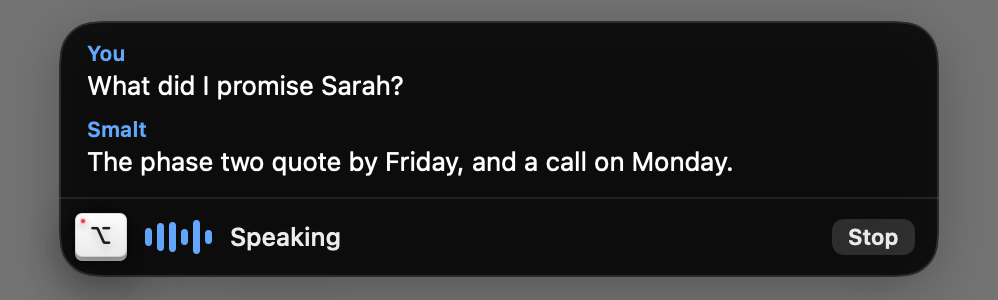
Who answers is Settings → Voice Assistant → Who answers you:
- Smalt answers with the cloud model you set in Settings → Cloud, from your folders.
- Claude Code: while you talk with it (
/smalt), the question goes to Claude Code. With no/smaltsession on, Smalt answers itself if the cloud model has a key. Otherwise the pill says what to do:

Languages and speech models
Smalt understands the language you speak, with nothing to set. The default model, Parakeet Ultra, covers 25 European languages. Settings → Models offers others:
| Model | Best for |
|---|---|
| Parakeet Ultra | The default and the most accurate: 25 languages, fast |
| Parakeet v3 | The default before; slightly less accurate, a smaller download |
| Parakeet Redux | The smallest download |
| Phonon-2 | English only, the fastest |
| Whisper Large v3 Turbo | 99 languages, including Chinese, Japanese, Korean and Arabic |

Only the default downloads by itself; another model downloads when you pick it.