 Smalt
Meeting notes
Smalt writes down your calls, you and the others, as they happen. When the call ends, you get a summary with the decisions and action items, saved as a file on your Mac.
Start and stop
Press ⌃⌥M, or point at the pill at the bottom of the screen and click Start Notes. Meeting notes in Settings → General and in the menu bar do the same. Press ⌃⌥M or the red stop button on the pill to stop. It works with any call app: Zoom, Google Meet, Teams, FaceTime, Slack.
The first time, macOS asks for the microphone (that's you) and for system audio (that's the others on the call).
Watch it live
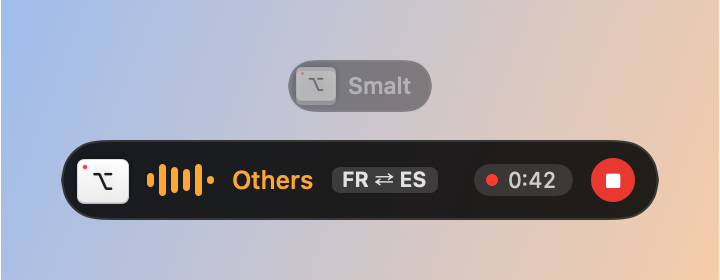
While notes run, the pill shows who is talking (Me or Others), the time and a stop button, and the last lines grow above it:

A long sentence shows while it's being said: the words that are sure appear solid, the newest few faint until the next pass confirms them. At the pause the whole sentence is transcribed once more and replaces it. Every line is saved as it arrives, so nothing is lost even if your Mac restarts mid-call.
- Click the pill, or press ⌃⌥S, to open the whole meeting. Back to Live or Esc folds it.
- Drag the pill anywhere; it stays there.
- Show Live Transcript in the menu bar opens the transcript in a window, with Copy All.
Between meetings the pill stays faint at the bottom of the screen. To hide it then, turn off Settings → Meetings → Keep Smalt on screen between meetings; during notes, dictation and voice it always shows.
Translate the call
When people speak another language, Smalt translates each of their lines into yours, right under it:

- Settings → Meetings → Translation → Translate the live transcript: pick Their words in English (your language; needs macOS 26).
- That's it: lines are translated on your Mac. Change your language under My language.
- A line in a language this Mac doesn't have yet says so, with Get right under it. macOS asks once, downloads it, and the lines that waited are translated.

Nothing is sent anywhere. Lines in your own language, and very short ones like "OK", stay as they are. The saved note keeps what was said, untranslated. Copy All copies what was said; its menu (or ⌥⇧⌘C) copies it with the translations.
Both ways, face to face is for talking with someone who doesn't share your language: what you say is also translated into theirs, large, so you can read it out; what they say is translated into yours. Pick Their language or leave it to what's heard in the call. When you repeat a sentence in their language, Smalt sees it's already said and doesn't translate it again.

Click the language tag on the pill (FR → EN, FR ⇄ ES) to pick one of the three (Don't translate, Their words, Both ways) and change the languages without opening Settings.
macOS translates about 20 languages. For the others (Swedish, Danish, Norwegian, Finnish, Czech…), set Settings → Cloud → Translation to Cloud: lines in another language are then sent to your cloud model's provider.
Your notes
When you stop, the note opens in your editor: a summary, key points, decisions, action items and the full transcript with times. Notes are Markdown files in ~/Documents/Smalt, only on your Mac.

Summaries
Smalt summarizes with Apple Intelligence on macOS 26: nothing leaves your Mac. Settings → Cloud → Meeting summaries chooses: This Mac, Cloud (the transcript is sent to your cloud model's provider) or Off (the note keeps the transcript, no summary). Without Apple Intelligence, pick Cloud or Off.
Calendar offers
Turn on Offer notes for calendar meetings and the pill offers, a few minutes before a meeting, to start notes named after the event. When the meeting ends, it offers to stop them, and stops two minutes later unless you click Keep. It only ever offers; your calendar stays on your Mac.
Tell the others
Settings → General → Copy Consent Message copies a short note to paste in the call's chat:
Heads up: I'm taking notes of this call locally on my Mac (Smalt). Nothing is uploaded. Let me know if you'd rather I didn't.Answers during the call
While notes run, Smalt can also answer questions people ask, from your own files, right under the question: see Live answers.